A Library for Representing Belief States
beliefs is a Python v2 library that was developed by Dustin Smith as part of his PhD research on natural language processing. It is covered under the GPLv3 license, which (in short) means it is open source and all derivations must remain so.
Release: 1.0 Date: December 03, 2013
Common operations on Belief States
Before you can use this library you must download it and add it to your Python’s import path. When you have done this, you will be able to import it and start using belief states:
from beliefs import *
Belief states are about a referential domain, so they are typically initialized by passing them a referential domain:
r = ReferentialDomain()
b = BeliefState(r)
A referential domain can be any container for the entities, each an instance of dicts.DictCell, which has a method for accessing them called r.iter_entities():
list(r.iter_entities()) # => [<DictCell:1...>, <DictCell:2...>, ..., <DictCell:6...>]
In a later section, Creating a referential domain, I will describe how to define the entities for a referential domain.
Two ways to view a belief state
A belief state can be viewed intensionally, as an attribute-value matrix, or extensionally, as a set of its referents.
Note
I will use the word referents in a technical sense to mean “all valid groupings of entities in the referential domain”. They should not be confused with entities. Entities are always individual items, whereas referents are sets, which in some cases may only contain singletons.
To see how many referents are in a belief state, call the method BeliefState.size(). This would return 63 for the currently empty belief state because our referential domain, \(R\), has 6 members, and an empty belief state will always have \(2^{|R|}-1\) possible members:
b.size() # => 63
One way to visualize the intensional content of a belief state is to simply use Python’s built-in print. If you have a taste for style or an affection for beauty, you can also call to_latex(). This method produces an attribute-value matrix (depends on avm.sy) and when rendered looks like this:
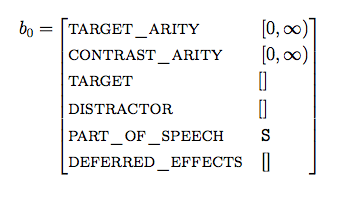
The 63 referents are are only implicitly represented. If we want to enumerate the extension of the belief state, we can call iter_referents() or iter_referents_tuples():
b.iter_referents()  # returns iter object

# loops over the iterator of just the referent's indices
for targetset in b.iter_referents_tuples():
  print targetset
Changing beliefs
To add or update a belief state’s property, use the BeliefState.merge() method. Unlike the DictCell.merge(), which only requires one argument, a belief state’s merge() requires two arguments, a path and value. The path argument must be list of keys that specifies the location of the (potentially nested) component to be added or modified, and value must be an instance of a cells.Cell. For example:
value = IntervalCell(5, 100)
b.merge(['target', 'size'], value)
Alternatively, we could have merged using the single-argument DictCell.merge() by calling the nested cell directly:
b['target']['size'].merge(value)
However, by calling belief state’s merge() instead, it has the additional functionality that whenever the property at the specified path doesn’t exist (and, for ['target','size'] it didn’t), the belief state will find an entity in the referential domain that does have a cell at path, and will add an empty cell of the same type and domain to the belief state and set its value to value:
b['target']['size'] # => [5, 100]
Another reason for having a separate argument for path is that it allows us to use late-binding of the path value. As we will see later, when defining action operators, we will want to generate effect functions that will include a merge() call that affects a different belief state at a later time.
In a similar manner, we can change a belief state’s meta-data using the same merge() method:
b.merge(['targetset_arity'], 2)
b.size() # => 15
Because \({6\choose 2}=15\); there are 15 unique target sets of size two in this belief state. If we want to see them by their indices:
list(b.iter_referents_tuples()) # => [(0, 1), (0, 2), (0, 3), (0, 4), (0, 5), (1, 2), (1, 3), (1, 4), (1, 5), (2, 3), (2, 4), (2, 5), (3, 4), (3, 5), (4, 5)]
Parts of a belief state
By default, a belief state contains the following attributes and values:
| target: | an attribute-value matrix describing properties that a referent in the domain must entail to be considered consistent with the belief state. |
|---|---|
| distractor: | an attribute-value matrix describing properties that a referent in the domain must not entail to be considered consistent with the belief state. This allows it to represent negative assertions. |
| target_arity: | an interval (initially \([0,\infty))\) representing the valid sizes of a target set. |
| constrast_arity: | |
| an interval (initially \([0,\infty))\) representing the valid sizes of the difference in the sizes of a target set and the set containing all consistent referents. | |
| part_of_speech: | a symbol (initially S representing the previous action’s part of speech. |
| deferred_effects: | |
| a list (initially empty) that holds effect functions and the trigger part_of_speech symbol that indicates when the function will be executed on the belief state. | |
Comparing belief states to entities in the referential domain
The core responsibly of the belief state is to maintain a develop a description about the intended group of entities in the referential domain. Within all of the elements that produce or act on the referents, e.g. size(), iter_referents() and iter_referents_tuples(), there is a check to see which entities entail the belief state’s target description and do not entail its distractor description. This can be achieved by using the entails() method or its inverse, is_entailed_by():
for entity in r.iter_entities():

  # does the belief state's target contain a subset of the information in entity?
  print b['target'].is_entailed_by(entity)

  # does the belief state's target contain at least all of the information of entity?
  print b['target'].entails(entity)

  # do they both entail each other: are they equal?
  print b['target'].is_equal(entity)
You probably will not have to compute entailment to the entities in the referential domain yourself because the belief state does this for you in the higher level methods. However, it is useful to know that each subclass of Cell can be tested for entailment or equality using these methods.
Copying belief states
Another useful method is BeliefState.copy(), which is what you’ll use to create a copy of the belief state. It’s highly optimized (but there’s still room for improvement!) so that only the mutable components of its cells are copied by value, the rest are copied by reference. You will want to call this whenever you generate a successor during a search over belief states:
b2 = b.copy()
b2.is_equal(b)   # => True
b2 == b          # => True (__eq__ points to is_equal)
id(b2) == id(b)  # => False
Creating a referential domain
The elements in the referential domain must be represented by objects that are instances of dicts.DictCell—essentially they are a collection of (potentially nested) attribute-value pairs. Beneath the hood, belief states are dicts.DictCell; however only its properties target and distractor are explicitly compared with the referential domain.
Another way to author the referential domain is to use the Referent class. It’s a subclass of dicts.DictCell with some additional object-oriented features, which allow you to use inheritance:
import sys
from beliefs.referent import *

class SpatialObject(Referent):
    """ Represents the properties of an object located in 3D space """
    def __init__(self):
        super(SpatialObject, self).__init__()
        self.x_position = IntervalCell()
        self.y_position = IntervalCell()
        self.z_position = IntervalCell()

class PhysicalObject(SpatialObject):
    """ Represents objects that occupy space"""
    def __init__(self):
        super(PhysicalObject, self).__init__()
        self.length = IntervalCell()
        self.width = IntervalCell()
        self.height = IntervalCell()

class LanguageProducer(Referent):
    """Something that produces a natural language"""
    def __init__(self):
        super(LanguageProducer, self).__init__()
        self.language = SetIntersectionCell(['en', 'fr', 'de', 'pt', 'sp'])

class House(PhysicalObject):
    """A dwelling"""
    def __init__(self):
        super(House, self).__init__()
        self.bathrooms = IntervalCell(0, 1000)
        self.bedrooms = IntervalCell(0, 1000)

class Human(PhysicalObject, LanguageProducer):
    """ A physical object that produces language and has a home """
    def __init__(self):
        super(Human, self).__init__()
        self.name = StringCell()
        self.possessions = DictCell({'home': House()})


TaxonomyCell.initialize(sys.modules[__name__])
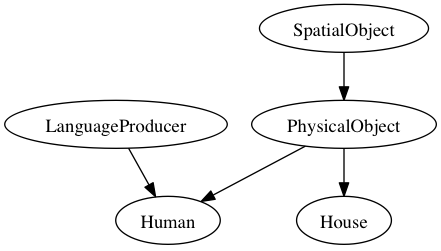
That TaxonomyCell.initialize weirdness at the end will automatically generate a posets.PartialOrderedCell property called kind with the inheritance structure of your Referent subclasses. Each entity will be given its class name, its most specific kind, as the initial value:
dustin = Human()
dustin['name'].merge("Dustin")  # you can also use (see warning):   dustin['name'] = "Dustin"
dustin['kind'] #=> Human
dustin['kind'].to_dotfile()  #=> writes TaxonomyCell.dot
By calling posets.PartialOrderedCell.to_dotfile(), a DOT file will appear that shows the inheritance structure:
Warning
You are encouraged to get in the habit of using merge(): instead of Python’s built in assignment operator, =, to set a value for a cell. Although dicts.DictCell will try to try to treat the assignment as a merge, it will only work for preexisting attributes. This means, for example, when you use BeliefState.merge(), which has the additional feature of creating new cells when they do not exist, you must use merge() and not =.
Cell types
These are type subclasses of Cell data containers, which accumulate and maintain the consistency of partial information updates (via merge() operations).
- bools.BoolCell three-valued logic of True, False, and Unknown.
- dicts.DictCell a labeled set, like a Python dict that pairs attributes with cell values.
- numeric.IntervalCell a bounded interval or cardinal number
- sets.SetIntersectionCell a set, unordered collection of symbols, where merges are intersective and information is thereby monotonically decreasing
- lists.LinearOrderedCell a bounded sequence of ordered symbols
- lists.PrefixCell maintains sequences with shared elements
- posets.PartialOrderedCell maintains a taxonomy of information
Specific types of classes are expected to only be merged with cells of their same type. There are a few exceptions where the merged value is first converted into a cell of the corresponding type.
This library is being developed at <https://github.com/EventTeam/beliefs>.